For many apps, the description and reviews are the main factors in whether a person downloads your app. Make sure that you spend some time researching your audience, understanding what drives them to download apps, what they search for when looking for apps, and what would convince them to download your application. Simply having the best mobile application in the world will do you no good if nobody can find it or understand what it does.
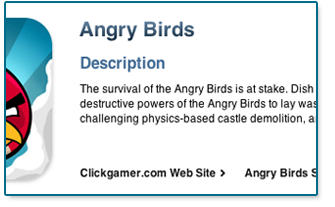 Fortunately, descriptions can be updated after submission to Apple, unlike your Keywords, which are locked in after your initial submission to apple. With each revision of your app that you submit, you should take a look at your description, making sure it is still accurate, and include any important updates or features that have been added to your app that would entice your users to update the app.
What does an App Description need to Do?
Most importantly it needs to sell your app to the widest audience possible. But you don’t want to overpromise in your description and cause unhappy users. You need to explain to viewers exactly what the app does and what they should expect out of the app. Focus on the benefits that users will gain, this is even more important in a paid app as you are asking for money to download you app; users will want to be reassured that they will receive something in exchange for their money. That can be entertainment as in the form of a game, or an easier way to accomplish tasks, as in the form of a utility app. Either way, make sure that your users know what’s in it for them.
What are the General Rules in Writing a Description?
- Must be between 10 and 4000 characters
- The First 580 characters will show in iTunes before the “MORE” link
- Text only in the description, no HTML is allowed
- Make sure to check spelling and grammar before submission
- The description is only about your app, don’t use it as a way to communicate with users or your customers
Some Basics to Keep in Mind
- Accurately Describe Your App: You want to make sure that your description accurately describes your app. Make sure that it showcases the features and benefits of your app, what the user experience might be like, and why someone would download and use your application.
- Keep It Short & Sweet: Your description should be written so that users can understand the basics of your app without having the click the “More” link in iTunes or on their mobile device, this happens after you reach 580 characters. After 580 characters you can go in to more details and specifics, but just like anything, you will lose readers the longer it goes on, so make sure the opening is strong.
- Bullets: Having clear, concise bullets is key. Bullets showing the features and benefits of your app are highly effective.
- Use Engaging Screen Shots: While not technically part of the description, using images that backup what you say in your description is important. Often the Home or Splash screen is shown, but then make sure to show some of your more attractive screens.
- Make sure the content is legible & appropriate
- Consider cultural sensitivity in picking screens
- Remove the Status bar from your images
- Add In Reviews: If any blogs or reviewers have reviewed your app, it may be a good idea to go back and update your app description, especially for positive reviews. They will carry more weight than the reviews from users of your app.
- Update Your Description: Don’t just let your description get stale, with each update of your app, make sure to take a look at your description, add in any new information such as update details, revisions, or new reviews of your app.
Writing your app description should not be an afterthought, but rather constructed with a great deal of thought and care to ensure it gives your app the best possible representation in the app store. Don’t be afraid to hire professional writers or editors to help with the creation of your description. Additionally, full-service app development companies, like Accella, can help you write a killer app description that will help sell your app.